Front vs. top radiator placement: how to achieve balanced PC airflow
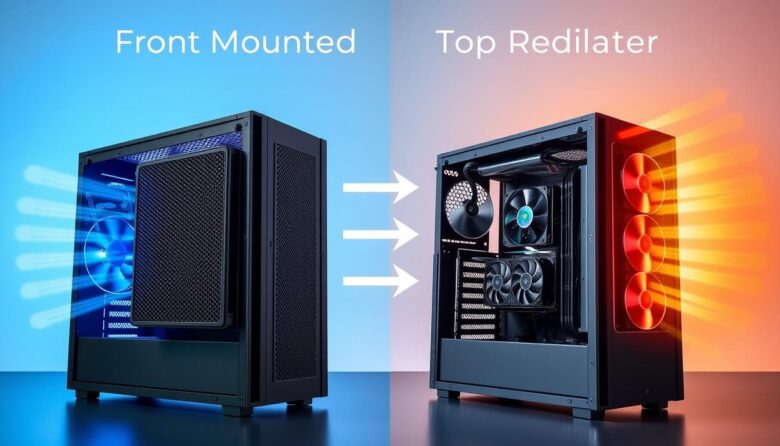
A front-mounted intake radiator usually prioritizes CPU and coolant temperature, while a top-mounted exhaust radiator often gives the graphics card and internal components a cleaner supply of outside air. The best position depends on the complete case, not one temperature.
The SoftJean Editorial Team reviewed current manufacturer guidance on AIO placement, radiator orientation, case airflow, fan direction, and component clearance. Unsupported personal tests and universal temperature claims from the original article were removed.
Radiator placement changes which component receives the coolest air first. When a front radiator operates as an intake, outside air passes through the radiator before entering the case. This can favor CPU cooling, but the graphics card and motherboard receive air that has already absorbed heat from the coolant.
A top-mounted radiator is normally configured as exhaust. Front or side intake fans supply air to the graphics card, while the top radiator removes CPU heat from the case. The CPU may receive slightly warmer air, but overall system balance can improve during GPU-heavy workloads.
Practical recommendation
Use a front or side intake radiator when CPU temperature is the main priority, the front panel provides unrestricted airflow, and enough top and rear exhaust capacity is available.
Use a top exhaust radiator when GPU temperature, internal case temperature, straightforward heat exhaust, or radiator orientation is the greater priority.
Do not bottom-mount a normal AIO radiator when that makes the pump the highest point in the sealed circuit.
Front or side radiator as intake with top and rear exhaust fans.
Top radiator as exhaust with unrestricted front or side intake fans.
Choose the position that prevents the CPU or GPU fan curve from becoming the loudest source.
Use the location with correct radiator, fan, tube, memory, GPU, and cable clearance.
Published results from one case, processor, graphics card, radiator, and fan arrangement cannot be applied directly to another build. Front-panel restriction, bottom intake fans, radiator thickness, CPU power, GPU power, fan curves, and room temperature can change the outcome.
Front intake and top exhaust at a glance
Front radiator as intake
Outside air passes through the radiator before reaching internal components.
- Radiator receives relatively cool outside air.
- Often favors CPU and coolant temperatures.
- Can work well in cases with an open mesh front panel.
- May support larger radiators than the top position.
- Radiator-heated air enters the case.
- GPU and motherboard temperatures may increase.
- Radiator thickness can reduce graphics-card clearance.
- Drive cages and PSU shrouds may block the lower end tank.
Top radiator as exhaust
Case air passes through the radiator and leaves through the roof.
- CPU heat is expelled directly from the case.
- Front intake air can reach the graphics card first.
- The radiator naturally remains above the pump.
- Often creates a simple front-to-back and bottom-to-top path.
- The radiator may receive air already warmed by the GPU.
- CPU or coolant temperature can be slightly higher.
- Memory, VRM heatsinks, and CPU power cables may interfere.
- Some cases support a smaller radiator at the top than at the front.
| Factor | Front intake radiator | Top exhaust radiator |
|---|---|---|
| CPU and coolant temperature | Often favored because the radiator receives outside air | May be slightly warmer because case air reaches the radiator |
| GPU temperature | May increase because radiator-heated air enters the case | Often favored because front intake air reaches the GPU directly |
| Motherboard and storage temperature | Can be affected by warmer intake air | Can benefit from unrestricted front or side intake airflow |
| AIO air management | Good when the radiator top remains above the pump; tubes-down is preferred when practical | Generally favorable because the complete radiator remains above the pump |
| Main clearance risk | Graphics card, drive cage, PSU shroud, and tube reach | Memory, VRM heatsinks, motherboard covers, and CPU power cable |
| Best starting use | CPU priority | GPU and case priority |
When a front-mounted radiator works best
A front-mounted radiator is most effective when the case has a mesh or otherwise low-restriction intake. The fans draw outside air through the filter, front panel, and radiator before sending it into the main chamber.
Mesh, large side vents, and adequate spacing allow the radiator fans to draw air without excessive restriction or turbulence.
Top and rear exhaust fans help remove the radiator-heated air before it recirculates around the graphics card.
Bottom intake fans can supply additional outside air directly to the graphics card in cases that support them.
Recommended front-radiator airflow
- Install the front radiator fans as intake when CPU cooling is the priority.
- Use top and rear fans as exhaust to remove radiator-heated air.
- Keep the front panel, filter, and intake vents clean.
- Check that the radiator does not reduce GPU clearance excessively.
- Confirm that tubes reach the CPU without kinking or pulling on the pump block.
- Keep the top of the radiator above the pump.
- Position the tube connections at the lower end when the case and cooler permit it.
A radiator installed behind a nearly solid panel, narrow side vent, or dense filter may receive less airflow than a top radiator in the same case. Listen for turbulence and compare fan RPM, coolant temperature, and component temperatures with the front panel installed.
When a top-mounted radiator works best
Top mounting is commonly selected for a balanced gaming system because front or side intake fans can send outside air directly toward the graphics card. The radiator then acts as part of the exhaust path.
Front or side intake fans must supply enough fresh air for the graphics card, motherboard, and top radiator.
A rear exhaust helps prevent warm air from collecting around the CPU socket and upper graphics-card area.
The radiator and fans must clear memory, VRM heatsinks, motherboard covers, and the CPU power cable.
Recommended top-radiator airflow
- Configure the top radiator as exhaust in a conventional airflow layout.
- Provide strong front or side intake airflow.
- Use a rear exhaust fan when the case supports it.
- Check whether the top radiator blocks access to the CPU power connector.
- Measure radiator thickness plus fan thickness before purchasing.
- Check memory and VRM heatsink height along the complete radiator path.
- Keep cables away from the radiator fans.
Powered fans create the dominant airflow inside a PC. Top exhaust is often effective because it supports a clear, directed airflow path—not because natural convection alone can move enough heat through a modern system.
Build one continuous airflow path
Radiator placement should complement the remaining case fans. Avoid fan groups that blow directly against one another or recirculate heated air between neighboring openings.
Balanced front-radiator layout
- Front radiator fans: intake.
- Rear case fan: exhaust.
- Top case fans: exhaust.
- Bottom fans: optional intake for the GPU.
- Side fans: use only when they support the same general path.
This arrangement prioritizes cool radiator intake while providing several exits for the warmed air.
Balanced top-radiator layout
- Front or side case fans: intake.
- Bottom fans: optional intake for the GPU.
- Top radiator fans: exhaust.
- Rear case fan: exhaust.
- Unused openings: manage with filters or fan tuning as needed.
This arrangement supplies the graphics card and motherboard before sending the air through the radiator and out of the case.
Two fan groups moving air toward each other can create turbulence, local recirculation, and additional noise. Cable bundles, solid panels, and poorly positioned fan hubs can also disturb the airflow path.
Radiator and tube orientation
A sealed AIO contains a small air pocket. The general objective is to keep that air in a higher part of the radiator rather than around the pump.
The radiator remains above the pump, making it a favorable orientation when case clearance and airflow are appropriate.
The top of the radiator traps the air pocket away from the tube connections and pump when the tubes can reach safely.
Can operate when the radiator top remains above the pump, but may create more trickling or air movement near the tube connections.
When the pump becomes the highest point in the sealed circuit, air can collect around the impeller. This may increase noise, reduce circulation, and shorten the useful life of the cooler.
Do not force a tubes-down front installation when the tubes are too short or must bend sharply. A relaxed tubes-up installation with the radiator top above the pump is safer than a tubes-down layout that kinks the hoses or pulls on the pump housing.
Clearance problems can decide the position before airflow does
Tall memory, VRM heatsinks, motherboard covers, fan cables, and the CPU power connector can occupy the radiator-and-fan stack.
The radiator and fan thickness can reduce graphics-card length clearance and obstruct the GPU power-cable bend.
A case may support a radiator in one position only, or allow different sizes at the top, front, and side.
| Measurement | Top mount | Front mount |
|---|---|---|
| Total installation depth | Radiator plus fans must clear the motherboard and memory | Radiator plus fans must clear the graphics card and shroud |
| Radiator length | Must clear the rear frame and front I/O assembly | Must clear the PSU shroud opening and case floor |
| Radiator width | Must not overlap VRM heatsinks or memory excessively | Must fit between frame rails and side-panel structures |
| Tube reach | Must reach the CPU without pressing against memory or the rear fan | Must reach without kinking around the GPU or PSU shroud |
| Maintenance access | CPU power and memory should remain serviceable | GPU removal and front-filter cleaning should remain practical |
A case may list 360mm support at the top and front while imposing different thickness, memory-height, GPU-length, or simultaneous-radiator restrictions. Similar case names and revisions are not always interchangeable.
Radiator position can shift noise from the CPU to the GPU
The quieter configuration is not automatically the one with the lowest CPU temperature. Front intake may let radiator fans run more slowly while causing the graphics-card fans to work harder. Top exhaust may slightly increase radiator-fan speed while reducing GPU fan activity.
Front intake may be quieter when
- The workload is CPU-heavy and the GPU is lightly loaded.
- The front panel is open and unrestricted.
- The radiator fans have a smooth low-speed profile.
- Bottom intake fans provide separate air to the GPU.
- Top and rear exhaust fans remove heat efficiently.
Top exhaust may be quieter when
- Gaming or rendering heavily loads the graphics card.
- The GPU becomes the dominant noise source.
- Front intake fans deliver cool air directly to the GPU.
- The top radiator has enough fresh intake air available.
- The roof panel does not create strong turbulence.
A radiator curve based only on rapid CPU spikes can create unnecessary fan surging. Use coolant temperature when the cooler supports it, or apply a smoother response and delay that still protects the processor during sustained workloads.
Positive, neutral, and negative case pressure
Case pressure describes the relationship between intake and exhaust airflow. Fan count alone does not determine the result because fan size, RPM, filters, radiator resistance, grills, and panels change the actual airflow.
| Pressure tendency | Possible advantage | Possible limitation | Practical use |
|---|---|---|---|
| Positive | Can reduce dust entering through unfiltered gaps | Warm air may escape less directly when exhaust is insufficient | Use filtered intake with clear exhaust openings |
| Neutral | Provides a balanced continuous airflow path | Difficult to achieve precisely under every fan speed | A useful general target for mixed workloads |
| Negative | Can remove warm air quickly | May draw dust through unfiltered openings | Useful only when intake paths remain adequate and clean |
Mild positive or approximately neutral pressure is a practical starting point for many filtered cases. Do not sacrifice radiator airflow or GPU cooling merely to achieve a specific pressure label.
Does the same placement advice apply to custom loops?
The airflow trade-off remains similar: an intake radiator receives cooler outside air but warms the case, while an exhaust radiator receives warmer internal air but sends its heat outside.
Custom loops add more variables because the pump and reservoir are separate from the CPU block, multiple radiators may be used, and the CPU and GPU can share the same coolant.
- Consider the combined CPU and GPU heat entering the coolant.
- Check whether one radiator exhausts heated air into another radiator.
- Preserve pump, reservoir, drain, and fill access.
- Include fitting and tube protrusion in clearance measurements.
- Use coolant temperature to control radiator fans when possible.
- Avoid positioning a pump so its inlet can draw air from the reservoir.
- Evaluate all radiators together rather than treating each one independently.
A common approach uses a front or side radiator as intake and a top radiator as exhaust. The final result depends on radiator area, component power, case restriction, and whether the exhaust radiator receives air already warmed by another radiator.
How to test front and top placement fairly
A meaningful comparison requires more than recording one CPU temperature. Test the complete system under the same conditions.
Record the original configuration
Note radiator position, fan direction, fan RPM, pump RPM, case-fan layout, filters, panels, CPU power, GPU power, room temperature, and the workload.
Use the same thermal paste and mounting method
Remounting the pump block can change contact quality. Apply fresh paste according to the cooler or paste instructions and tighten the block consistently.
Match actual fan and pump speeds
Compare real RPM rather than applying the same PWM percentage. Keep the pump profile and unrelated case fans unchanged.
Use representative workloads
Test CPU-heavy work, GPU-heavy gaming, and a combined workload when those scenarios match the way the computer is used.
Allow the cooling system to stabilize
Coolant temperature changes gradually. Continue the workload long enough to observe a stable trend rather than comparing brief processor spikes.
Record more than CPU temperature
Monitor GPU temperature, GPU hotspot, coolant temperature, CPU package temperature, motherboard sensors, storage temperature, fan RPM, pump RPM, and throttling status.
Compare noise with the case closed
Test from the same position with the normal filters and panels installed. Panel restriction and turbulence can change the result significantly.
Different room temperatures, CPU power, GPU loads, fan speeds, case panels, monitoring tools, and workload durations make direct comparisons unreliable.
Which radiator position should you choose?
Choose front intake when
- CPU or coolant temperature is the primary concern.
- The front panel has a large, unrestricted mesh area.
- The graphics card receives separate bottom or side intake air.
- Top and rear exhaust capacity is strong.
- The radiator does not block the graphics card or drive hardware.
- The tubes reach comfortably in a safe orientation.
Choose top exhaust when
- GPU temperature and gaming acoustics are the main priority.
- Front or side intake fans can supply enough outside air.
- The radiator-and-fan stack clears the motherboard and memory.
- You want the radiator fully above the pump.
- The case roof has an unrestricted exhaust opening.
- The CPU remains within its intended thermal and performance range.
A correctly installed front radiator is better than a top radiator pressed against memory or a power connector. A correctly installed top radiator is better than a front radiator that blocks the graphics card, kinks the tubes, or suffocates behind a solid panel.
Common radiator-placement mistakes
Top exhaust can favor the GPU and case airflow, but the radiator may receive warmer air and may not fit above the motherboard.
It can favor the CPU while sending radiator-heated air toward the graphics card and motherboard.
Powered fans dominate case airflow. Direction, restriction, and fan speed matter more than natural convection inside an operating PC.
A solid panel or narrow vent can reduce radiator airflow and increase fan noise.
This can allow the AIO air pocket to collect around the pump and create noise or reduced circulation.
Tubes should not be kinked, stretched, twisted, or pressed against the graphics card to achieve a preferred visual direction.
A radiator that fits by itself may collide with memory, the GPU, motherboard heatsinks, or case panels after the fans are added.
A layout that improves the CPU may increase GPU, motherboard, SSD, or total system noise.
Nearby intake and exhaust fans that fight each other can create turbulence and recirculation.
CPU-heavy, GPU-heavy, and combined workloads may require different airflow priorities.
Frequently asked questions
Is a front-mounted radiator better than a top-mounted radiator?
Neither is universally better. Front intake often favors CPU and coolant temperature, while top exhaust often favors GPU and internal case temperature. Compatibility and case airflow can reverse the expected result.
Which position is best for gaming?
Top exhaust is a strong starting point for GPU-heavy gaming because front intake air can reach the graphics card directly. A front intake radiator can still work well when the GPU receives additional bottom or side intake airflow.
Which position is best for rendering or CPU-heavy work?
Front or side intake can favor sustained CPU cooling because the radiator receives outside air. The complete system should still be checked for GPU, motherboard, and storage temperatures.
Should a top radiator be intake or exhaust?
Exhaust is the conventional recommendation when the case has sufficient front or side intake. It creates a directed path through the case and prevents the radiator from sending heated air downward toward internal components.
Should a front radiator be intake or exhaust?
Intake is normally selected when CPU temperature is the priority. Front exhaust can work in specialized layouts, but it may oppose the conventional front-to-back airflow path and requires careful testing.
Will a front radiator increase GPU temperature?
It can because the air entering the case has already passed through the warm radiator. The effect depends on GPU power, radiator heat, front restriction, exhaust capacity, and whether bottom or side intake fans supply separate air to the GPU.
Will a top radiator increase CPU temperature?
It can be slightly warmer because the radiator may use air heated by the graphics card and motherboard. The difference depends on the case and workload and may be less important than the improvement in GPU temperature or system noise.
Do front-radiator tubes have to be at the bottom?
Tubes at the bottom are preferred when they reach without stress. Tubes at the top can operate when the highest part of the radiator remains above the pump. Avoid kinks, tension, and placing the pump above the radiator.
Can I mount an AIO radiator at the bottom?
It is generally not recommended because it can make the pump the highest point in the sealed loop, allowing air to collect around the pump.
Does push or pull change which position is best?
Push and pull describe which side of the radiator holds the fans. Intake and exhaust describe the airflow direction through the case. Either radiator position can use push or pull when the fans move air in the intended direction.
Does radiator thickness matter?
Yes. A thicker radiator increases the total stack depth and can create memory, GPU, motherboard, cable, or panel conflicts. It may also require fans with stronger pressure performance.
Should I remove the front dust filter for better cooling?
Removing a restrictive filter may improve airflow but increases dust entering the radiator and computer. A better long-term solution is an adequately ventilated case, suitable fans, clean filters, and a balanced fan curve.
How many exhaust fans should a front radiator use?
There is no universal number. A rear exhaust and one or more top exhaust fans are a common starting point. Actual fan size, speed, radiator restriction, panel design, and GPU heat determine the required capacity.
How can I tell which layout is quieter?
Test the same CPU and GPU workloads with matched fan and pump speeds, normal panels and filters, and the same listening position. Note whether radiator fans, GPU fans, pump noise, or panel turbulence dominate.
Can a side radiator be treated like a front radiator?
In many dual-chamber cases, a side radiator operating as intake behaves similarly to a front intake radiator. Pair it with top and rear exhaust airflow and keep the radiator top above the pump.
Final recommendation
Start with a front or side intake radiator when the processor is the main heat source and the case provides a low-restriction intake with strong top and rear exhaust airflow.
Start with a top exhaust radiator when the graphics card is heavily loaded, internal case temperature matters, and front or side intake fans can deliver outside air directly to the GPU and motherboard.
In either position, keep the radiator above the pump, avoid bottom mounting, verify the complete radiator-and-fan clearance, and test CPU, GPU, coolant, noise, and fan behavior together. The best placement is the one that produces the most balanced result in the actual case and workloads—not the one that wins a single temperature comparison.
- Noctua guide to front, side, and top AIO radiator placement
- Noctua case-airflow setup recommendations
- CORSAIR AIO radiator and tube-orientation guidance
- NZXT Kraken radiator-placement guidance
- NZXT examples of position-specific radiator and GPU-clearance restrictions
- Noctua guidance for determining fan airflow direction

The SoftJean Editorial Team creates practical guides about PC cooling, liquid cooling systems, AIO coolers, airflow, maintenance, and hardware troubleshooting. Our content is developed through careful research using manufacturer documentation, technical references, compatibility information, and trusted industry sources to help readers make safer and more informed decisions about their computer cooling setups.